Strava heatmap poster
Every run and ride you’ve logged, on one poster.
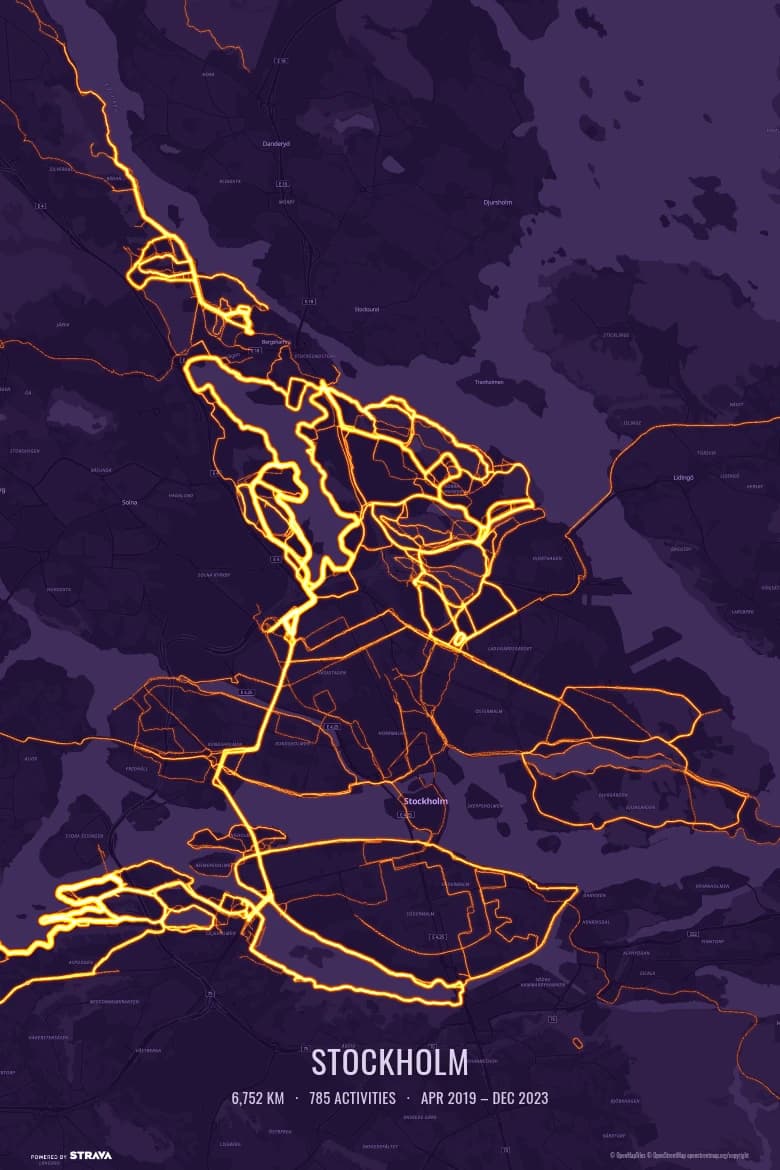
Strava’s personal heatmap lives on a screen. Heatmapster draws the same picture from your own activities and turns it into a 300 DPI print file: every street you’ve run, ridden, hiked or skied, glowing brightest where you go most.
 Free — 3 posters per account.
How to make a poster of all your Strava activities
- Connect Strava. Read-only access — nothing is ever posted or changed on your account.
- Choose what goes on the map. Everything you’ve recorded, one year, only runs, or only the activities with a certain name — your club runs, say.
- Frame it. Drag, zoom or search to set the crop. The preview is exactly what gets printed. Pick a colour theme and an optional caption with your name, total distance, activity count and dates.
- Download and print. A 12×18 inch (30.5×45.7 cm) PDF at 300 DPI, portrait or landscape — sharp enough for a frame on the wall, ready for any print shop.
Heatmap poster or route poster?
Most Strava poster sites make route posters: one activity — a marathon, a long ride — drawn with its stats. Many of them print and ship a framed poster, which is the better choice if you want it delivered ready to hang.
A heatmap poster answers a different question: where have I actually trained? Hundreds or thousands of activities overlap, so your regular loops and favourite climbs light up and one-off detours fade. That is what Heatmapster is built for.
It still does single routes — pick one activity and it fills the frame with the race name as the caption. What it doesn’t do is ship paper: you get the file and print it locally, which also means no postage and no waiting.
Printing tips
- The poster has 2:3 proportions, the same as standard 20×30, 30×45 and 40×60 cm frames and 8×12, 12×18 and 16×24 inch frames, so it fits without cropping.
- Matte paper suits the darker themes; the glow reads better without reflections.
- Frame the area you really train in. A tight crop around your home loops shows more detail than a whole region with a few long rides across it.
- A season or a single year makes a good gift or end-of-year poster; filter by year before you select.
Questions
How do I make a poster of all my Strava activities?
Connect your Strava account to Heatmapster, let it import your activities, select the ones you want (all of them, one year, or only runs, for example), then drag and zoom the map to frame your area. Generating gives you a 12×18 inch PDF at 300 DPI that any print shop can print. It takes a few minutes and is free — 3 posters per Strava account, with no payment step.
Can I export or print my Strava personal heatmap?
Strava shows your personal heatmap on screen but has no print-resolution export of it. Heatmapster rebuilds the same idea from your own activities: every route you select is drawn on one map, glowing brightest where you have been most often, at a resolution meant for a wall poster rather than a screen.
What is the difference between a heatmap poster and a route poster?
A route poster shows one activity — a marathon course or a long ride — usually with its stats. A heatmap poster overlays many activities, so the streets you use most stand out. Heatmapster does both: select everything for a heatmap, or a single activity for a route poster.
Which activities can I include?
Runs, rides, hikes and walks, cross-country and backcountry skiing, and other outdoor GPS activities such as paddling or skating. You can filter by year, date, distance, sport and activity name before choosing which ones appear.
Does it work if I only have a few activities?
Yes. With a short history the lines are drawn heavier, so a handful of runs still reads clearly on the poster, and a single activity fills the frame as a route portrait.
What size is the poster, and how much does it cost?
A 12×18 inch (30.5×45.7 cm) PDF at 300 DPI — 3600×5400 pixels — in portrait or landscape. It is free — 3 posters per Strava account, with no payment step. You print it wherever you like; nothing is shipped.
What does Heatmapster access on my Strava account?
Read access to your activities only. It cannot post, edit or delete anything on Strava. You can disconnect from Strava's settings at any time and ask for your stored data to be erased.
See your own heatmap
Connect Strava and your activities start importing straight away.